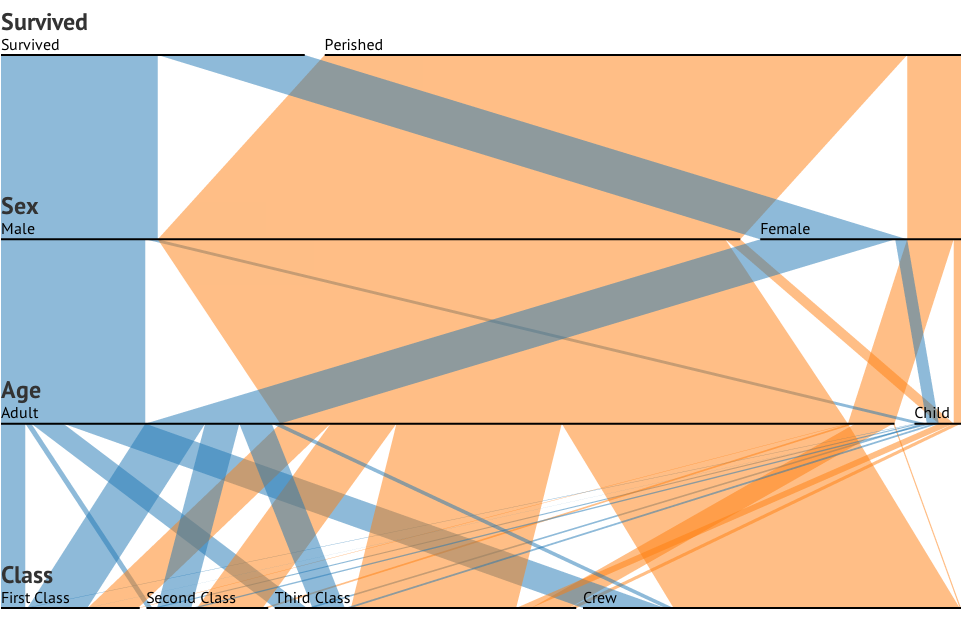
A visualisation technique for multidimensional categorical data.
Data: Robert J. MacG. Dawson.
For each dimension (Survived, Sex, Age and Class), a bar is shown for each of its categories, as wide as the number of people in it.
Starting with the first dimension (Survived), each of its categories is connected to a number of categories in the next dimension, showing how that category is subdivided. This subdividing is repeated recursively, producing a tree of “ribbons”.
In fact, you can imagine Parallel Sets as being an icicle plot, with icicles of the same category being “bundled” together.
Drag the dimensions and categories to reorder them. You can also click the “key” or “value” links that appear when you hover over or tap a dimension’s name, to order its categories by name or frequency; click again to reverse the order.
We can see at a glance that the relative proportion of surviving women is far greater than that of the men.
As for children, it becomes clearer when we drag the Age dimension up: around half the children survived. This is proportionally less than the women but more than the men. Can you spot anything else interesting?
The code is available as a reusable D3 chart: d3-parsets, which you can install with npm install d3-parsets. This is a configurable function, which can be called on a D3 selection to produce an interactive SVG visualisation.
The input data should be bound to the target selection. For input, you can either use an array of aggregated objects (pivot table) along with a value accessor, or you can simply use the full dataset and the grouped frequencies will be calculated automatically by default.
import parsets from "d3-parsets";
import "d3-parsets/style.css";
import {csv} from "d3-fetch";
import {select} from "d3-selection";

const chart = parsets()
    .dimensions(["Survived", "Sex", "Age", "Class"]);

const vis = select("#vis").append("svg")
    .attr("width", chart.width())
    .attr("height", chart.height());

csv("titanic.csv").then(function(data) {
  vis.datum(data).call(chart);
});For multivariate categorical data, the mosaic plot (or Marimekko chart) is a powerful alternative. Personally, I think it’s easier to see the order in which the subsets were derived in a parallel sets visualisation. On the other hand, it seems easier to spot small disparities in a mosaic plot because the subsets are laid out side-by-side. Here is a Marimekko chart in D3 by Mike Bostock.
For multivariate ordinal data (such as numeric data), parallel coordinates are more appropriate, although you can often generate meaningful categories from such data for use with parallel sets.
Probably the most interesting part of implementing this was supporting multiple concurrent transitions on the ribbons. Strictly speaking this wasn’t necessary, as it’s unlikely anyone would drag two things within the transition duration (though with Slow motion on, or two fingers on a touch screen, you can try). But who would pass up an opportunity to use a custom tween?
This allows the x- and y- components of the ribbons to be animated independently, so that you can drag a dimension vertically even though a horizontal category animation is in progress.
Tick “Slow motion” under the chart to see this more clearly.
In case you missed it, be sure to tick “Show icicle plot” in the Explanation section to see the animated transition.
Thanks to Mike Bostock for his suggestions (and of course, D3!)